Showing posts with label php5. Show all posts

PHP howto: Installing PEAR with WAMP on Window


Installing PEAR:

Here's the tutorial that I followed.

What is missing is the environment variables installation part. The tutorial only give Vista.

Got this from Microsoft website.

  1. Right-click My Computer, and then click Properties.
  2. Click the Advanced tab.
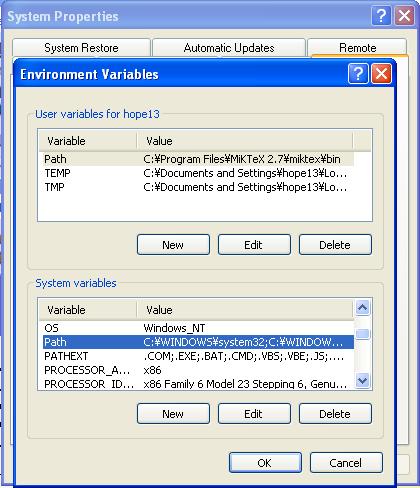
  3. Click Environment variables.


See the highlighted part under System variables, Path? Edit the Path variable and add you can add semicolon c:\wamp\bin\php\php5.3.0


You need to exit the command line if you have it open so the changes can take into effect.


Type path and you should see it.

Book Review: Learning PHP, MySQL, and JavaScript: A Step-By-Step Guide to Creating Dynamic Websites (Animal Guide)

Learning PHP, MySQL, and JavaScript: A Step-By-Step Guide to Creating Dynamic Websites (Animal Guide)


I needed to review php since everything have changed. I've tried head Head First PHP & MySQL and it wasn't technical and I thought the book style of teaching would help me absorb it better but it didn't. This book assume that you know a bit of programmer which is good cause you go through stuff much faster and absorb it better than the slow pace of Head First PHP & MySQL.

Anyway, this book went straight to each subject. It hits you with PHP, the MySQL, and touches on other subject. When I hit the Javascript part I stopped.

There are lots of code example errors and you should go here:

http://oreilly.com/catalog/errata.csp?isbn=9780596157142

Some of the stuff that the author goes over is confusing and shouldn't be use at all. For example, his php code example of combining HTTP authentication with PHP session code, the author goes over, a bit, about it and then briefly says something about logout session. You logout but only in the session as for the HTTP Authentication you haven't logout. How are you suppose to do this? I've tried clearing my browser personal data like cookies and such but with no luck. I've google and the consensus was to have a flag for the logout and the script should all be in one file unlike his 2 files (http auth and session) example.

There's also a line in the logout code that call the session again which throws an error, this code isn't corrected yet nor is it in the errata link above.

The Smarty introduction was basically an introduction, nothing more. The installation instruction was vague and unclear that's why I have a post on how to install it on window xp, (here). Linux should be a breeze.

The book example codes for php are all procedural. He doesn't really go into object oriented programming. When I hit the Javascript chapter I just stop reading. His Javascript coding style is horrible and ugly. The best practice is to declare the variable as var varible1 which he doesn't do and he ignore the semicolon because, in javascript, it isn't require. There is a better beginner Javascript book and I'll post up that review soon.

The mysql chapters are pretty good. It taught me new stuff about MySQL such as different database engine that MySQL have InnoDB and ISAM. It also show how to search through the database like a search engine. It was a good read, for me.

This book is a very basic beginner PHP for people that have a programming background. I would rate it a 3 star because it helped me dive back into PHP and solidify the very very basic of php5. It does not go into object oriented aspect of PHP5 at all. Warning: I've only read up to the Javascript part, I stopped afterward. Read up to chapter 16, there are 20 chapters in total.

Oh, I get Amazon moola, to buy more books, if you click the picture and buy the book. I wouldn't recommend buying it though.
PHP Session Video

Finding a good PHP IDE - Eclipse + PDT

So after using Dreamweaver CS3 for a couple months now I felt it was lacking. It wasn't as good as Microsoft Visual Studio. One of the thing it's lacking is a good auto complete, the way Dreamweaver CS3 handle most of the coding is annoying and not as natural as Microsoft Visual Studio.

I've googled a bit and found out about Eclipse IDE with PDT. So far it's a great ide. I do not know all about it but just enough through these videos:


Note: Code Assist is not on by default so you need to go to window->preferences->php->code assist and check the "enabled auto activation" checkbox the default 200 ms is long so I edit it to 20 ms.

Installation for Smarty PHP on WAMP


I got this from here: http://news.php.net/php.smarty.dev/2703


So.. here we go:

1. Download Smarty

2. Extract Smarty outside of www folder (ex: c:\wamp). Rename the Smarty.x.x.x folder to smarty.

3. Edit the php.ini file. To do this, left click on the wamp icon on the system tray, under php menu, there should be a php.ini option.

Here's an example of what you should put: include_path = ".;c;\wamp\smarty\libs"

WARNING: Copy and pasting it created some errors for me. The single quotes and double quotes weren't working so I had to delete them and retype them. Also note the path of the folder!

4. Restart all services. You should see that option when you click on wamp icon on the system tray.

5. Ok, now in your root www create a folder name smarty and within that folder create two folder named templates and configs. Outside of www, within the c:/wamp/smarty create these two folders templates_c and cache.

Note: There's something about security but I'm only using for local host. Any live testing will always be on a Linux system.

6. In www or any subfolders within www create a file any name you want, let's say index.html.

Here's the code for index.html:


Note: please look through the code and at the paths and try to understand it. Do not just copy and ignore it. Analyze it and type it out (copy and pasting might cause error dude to single and double quotes).

7. Now create the template file index.tpl (put it in www/smarty/templates):

index.tpl:

Look here: http://news.php.net/php.smarty.dev/2703. Blogspot will just parse out the html tags. So I cannot type it here.


Jquery Progress Bar, pecl c, PHP module, Debian

Howto install PECL uploadprogress

I need the uploadprogress php module for jquery progress bar. The reason why my boss and I chose this progress bar to the other ones out there is because this one does not use flash. Flash got some annoying bugs and it make web development annoying and at the same time makes our code ugly --full of band-aids and workarounds. Furthermore it was so hard to find any upload module for jquery that doesn't require flash. The reason for this is because javascript does runs on client side so they cannot keep track of the progress on the server side. Hence, how the is the progress going to gauge the completion percentage? The answer is a php module named uploadprogress.

Anyway, in most Linux distribution you install stuff and add a line in php.ini such as extension=uploadprogress.so and you're done. Not in debian!

Anyway here it is:

Step 1: Installing

sudo aptitude install php5-dev php-pear
sudo pecl install uploadprogress


Step 2: The Debian way of extension=uploadprogress.so

You need to create a file in conf.d to enable the any php extension in debian.

sudo vim /etc/php5/conf.d/uploadprogress.ini


Here's what my uploadprogress.ini looks like:

# configuration for php uploadprogress module
extension=uploadprogress.so

Step 3: Restart apache2


sudo /etc/init.d/apache2 restart

PHP - Upload

Coding some php and I realized there are certain images I cannot upload. I check the extensions and my codes. Then I wonder to myself if it's because of the size of the file? Yep it is.

By default PHP only let you upload up to 2Mb.


vim /etc/php5/apache2/php.ini

; Maximum allowed size for uploaded files.
upload_max_filesize = 2M


and
; Maximum size of POST data that PHP will accept.
post_max_size = 8M

I just changed it to something sensible 99999999M.

Drupal's Website Down Error

If you get this error from Drupal:

Unable to use the MySQLi database because the MySQLi extension for PHP is not installed. Check your php.ini to see how you can enable it.

The php.ini is located at: /etc/php5/apache2/php.ini

I was trying to give a direct link to php modules for one of the Drupal modules and it just didn't work.

Find It